ResearchWize can summarize webpage URLs and uploaded PDF documents. That makes it useful for articles, reports, course readings, handouts, and journal PDFs.
Source Workflow
Summarize articles and PDFs into structured research notes
The ResearchWize summary workflow is built for reading comprehension, source reuse, and faster study prep. Paste a webpage or upload a PDF, choose the summary profile, and generate notes that are ready for projects, study tools, and writing.
Snapshot, Insight, Comprehensive
Webpages + PDFs + OCR
Study tools + citations
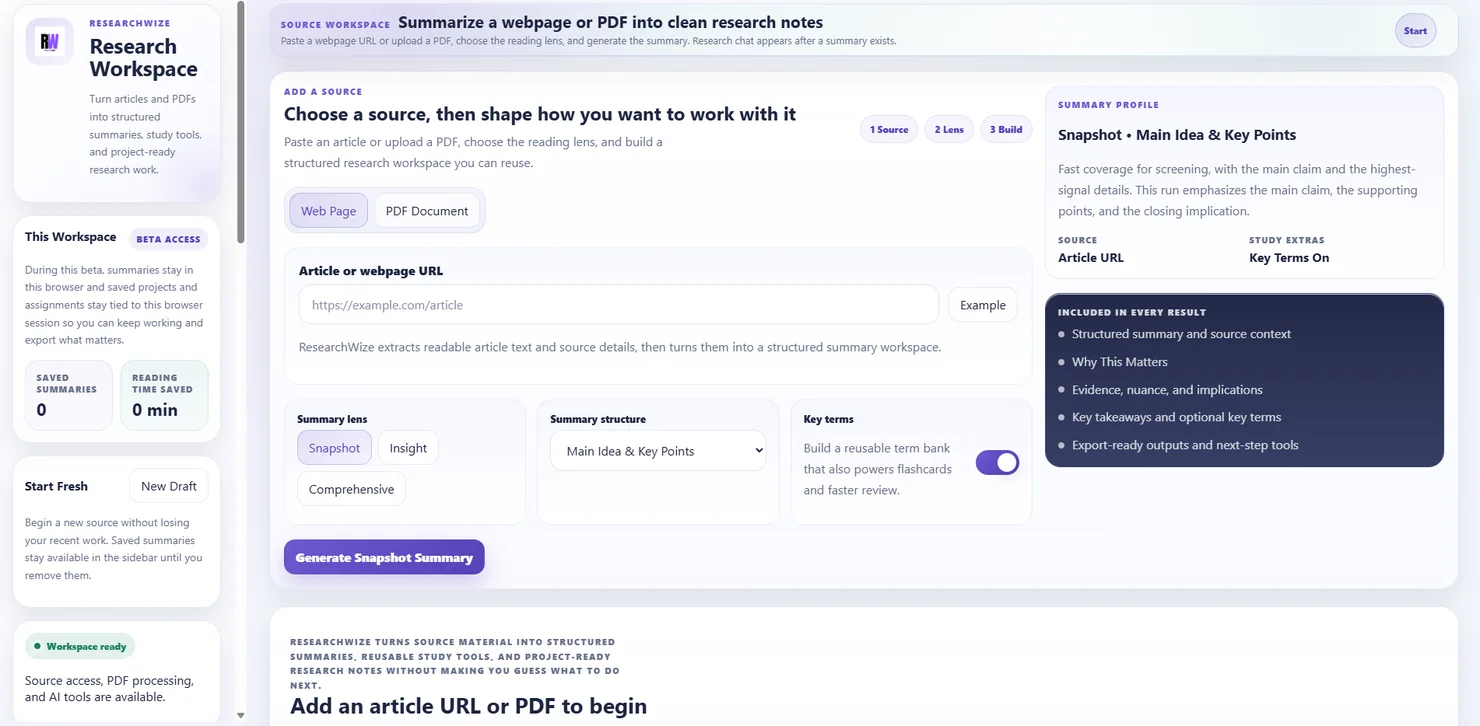
Choose the reading lens
Switch between faster overview reading and deeper source processing depending on what the class or assignment needs.
Build from one source
Use the same summary to create flashcards, quizzes, outlines, analysis, citations, project saves, and assignment support.
How the summary process works
From raw reading to reusable notes in a few focused steps
The summary workflow is built to help you understand a source, capture what matters, and move directly into study or writing without copying the same material into new tools.
01
Add a webpage or upload a PDF
Paste an article URL when the source lives on the web, or upload a PDF when the reading is in a report, handout, journal article, or saved course file.
02
Choose the summary depth
Use Snapshot for a faster scan, Insight for more explanation, or Comprehensive when you need deeper processing of the source.
03
Choose the structure that fits the reading
Switch the summary layout to match the assignment or subject area, whether you need main ideas, bullet points, argument and evidence, cause and effect, problem and solution, or step-by-step explanation.
04
Generate the source workspace
ResearchWize produces a structured summary with source context, why the source matters, takeaways, optional key terms, and deeper insight layers that are easier to study and reuse.
05
Turn that source into outputs you can use
Generate flashcards, discussion questions, quizzes, essay outlines, source analysis, and citations, or save the summary into a project and attach it to an assignment later.
Summary modes
Pick the depth that matches the task
Not every reading job needs the same level of detail. ResearchWize lets you choose the amount of depth before the summary is built.
| Mode | Best for | What you get |
|---|---|---|
| Snapshot | Fast reading checks, first-pass understanding, quick prep before class | A concise summary that surfaces the core claim, strongest support, key takeaways, and the most important terms. |
| Insight | Discussion prep, source selection, deciding what is actually worth saving | More explanation around evidence, implications, and why the source matters in the bigger picture. |
| Comprehensive | Heavier reading, deeper assignment prep, stronger source analysis | A fuller processing pass that supports writing, comparison, and more detailed project or assignment reuse. |
Summary structures
Shape the output around the kind of source you are reading
The workflow is not locked into one summary format. You can choose the structure that best matches a research article, explanation, process document, or argumentative reading.
Main Idea & Key Points
Useful when you want the clearest high-level read on what the source is arguing or explaining.
Standard or bullet summary
Good for quick review when you want clean reading notes without a lot of extra structure getting in the way.
Argument & evidence
Helpful for persuasive texts, opinion pieces, and research where the support matters as much as the claim.
Problem & solution
Works well for policy writing, case discussions, or readings that define an issue and propose responses.
Cause & effect
Useful for historical, social science, science, and analytical readings where relationships drive the meaning.
Step by step
Best when the source explains a process, workflow, method, or sequence that needs to stay clear from one stage to the next.
What the finished summary includes
Research notes that are built for reuse, not just a wall of text
The source workspace is meant to help with comprehension first and reuse second. The output is structured to make later studying, comparison, and writing easier.
Source details
Title, author, publisher, date, and other context that helps you place the reading before you cite or compare it.
Main summary
A readable synthesis of the source rather than a scattered note pile, so you can see the core point and strongest support quickly.
Why it matters
A focused explanation of the significance of the source and the bigger-picture reason it could matter in class or in an assignment.
Insight layers
Evidence details, practical implications, and nuance or caveats that help you judge the strength and limits of the source.
Takeaways
A fast review layer that pulls out the pieces most worth remembering before class discussion, quiz review, or writing.
Key terms
An optional term bank that supports flashcards, faster review, and clearer understanding of specialized language in the source.
From one source to many outputs
Everything you can generate after the summary is done
ResearchWize treats the summary as a working foundation. Once the source has been processed, the web app can turn it into multiple outputs that support studying and writing.
Flashcards
Turn key terms and main facts into a reusable review set for quick memory checks.
Discussion questions
Create class-ready talking points or prompts to prepare for seminars, tutorials, or discussion boards.
Study quizzes
Generate mixed, multiple choice, true or false, short answer, or fill-in-the-blank practice from the source.
Essay outlines
Build a writing structure from the source with tone, length, essay style, and citation settings.
Source analysis
Focus on claims, evidence quality, implications, comparison, bias, or other analytical angles.
Citations
Create clean source references in APA, MLA, Chicago, Harvard, IEEE, Vancouver, Nature, ACS, or AMA style.
After the summary
Keep the source alive inside projects, chat, and assignments
The summary workspace is not a dead end. You can keep working with the source after the first pass instead of losing it to a one-time output.
Save to a project
Store strong summaries in a project when you want to compare sources, build outputs across them, and return to the material later.
Ask summary chat
Use the current summary as working context when you need clarification, writing help, evidence checks, or a faster explanation of what the source is doing.
Use it in an assignment
Attach the saved source to the assignment workflow so the same reading can strengthen an essay, discussion post, research paper, or presentation.
FAQ
Questions about the summary workflow
Yes. The PDF workflow is built to extract readable text first, and OCR support helps recover text when the PDF is image-based or messy.
Yes. You can choose the depth level and the summary structure, including main idea and key points, standard summary, bullet points, argument and evidence, problem and solution, cause and effect, and step by step.
You can create flashcards, discussion questions, quizzes, essay outlines, source analysis, citations, project saves, and assignment support from the same source workflow.
Yes. A saved summary can be added to a project or attached directly to the assignment workflow so the same source helps strengthen the completed response.
Open the source workflow
Turn your next article or PDF into notes you can actually use
ResearchWize gives you a summary workflow that leads naturally into study tools, projects, writing support, and assignment improvement instead of stopping at one generic summary.