Yes. ResearchWize is built so you can start with the prompt, rubric, and notes you already have. You can add source support later if the review shows the evidence is still too thin.
Assignment Workflow
Complete assignments from the prompt, then strengthen them with better support
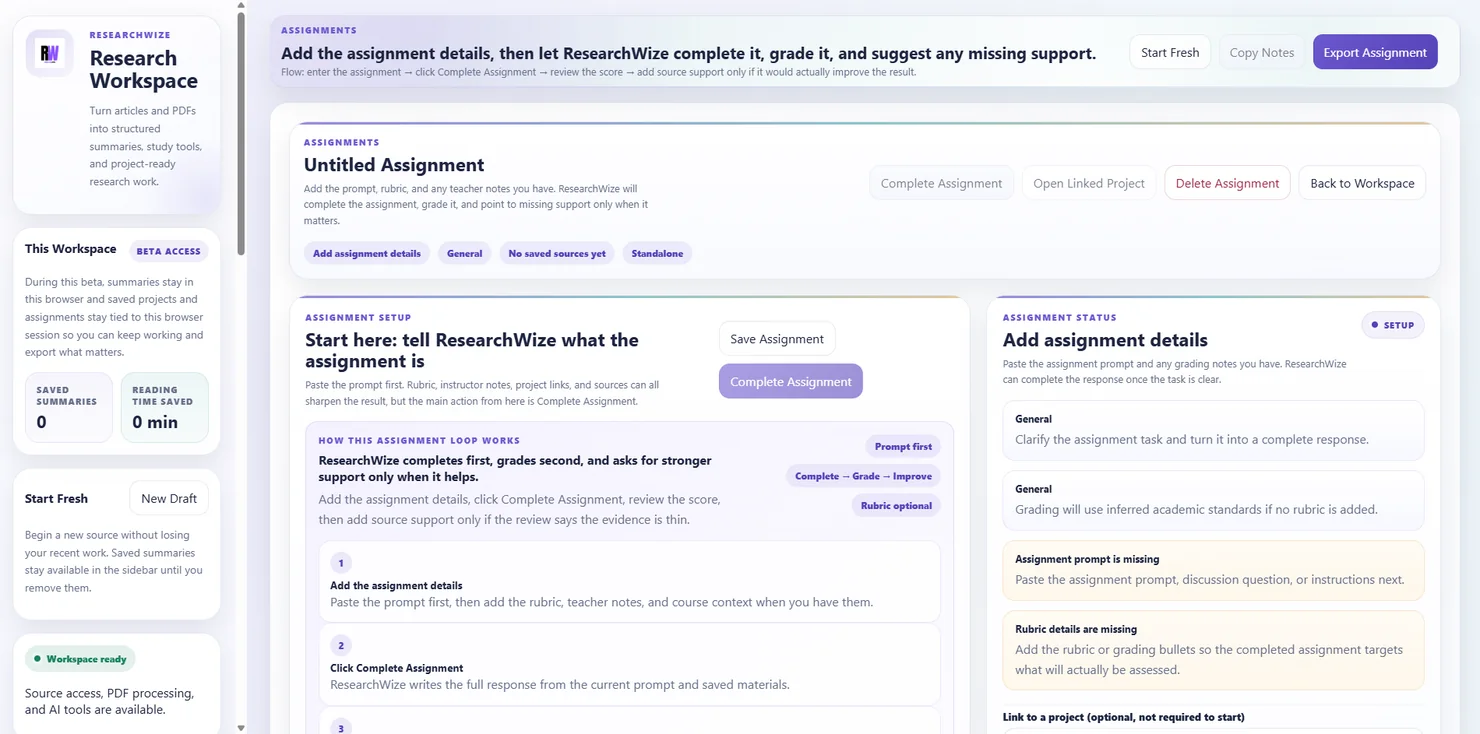
ResearchWize helps you move from assignment prompt to completed response inside one workspace. Start with the instructions you already have, add the rubric or course notes when they matter, and keep improving the result when stronger sources are added later.
Prompt + rubric + notes
Complete + review + improve
Essay, discussion, paper, slides
Start without sources if you need to
ResearchWize can complete the response from the prompt first, then tell you what evidence or support would make it stronger.
Update the result in place
When you add better material, the assignment can refresh inside the same workspace instead of making you rebuild it elsewhere.
How ResearchWize completes assignments
A clear loop from prompt to completed response
The assignment workflow is designed to reduce decision fatigue. You tell ResearchWize what the task is, it completes the response, shows where it stands, and then lets you strengthen the result only where it actually needs support.
01
Add the assignment setup
Enter the title, paste the prompt, and add the rubric, teacher notes, or course context if you have them. The more assignment-specific context you add, the more targeted the result can become.
02
Choose the response type or let it auto-detect
The workflow supports essays, research papers, discussion posts, presentations, reflections, short responses, and general assignments, and it can infer the type when the prompt makes it obvious.
03
Click Complete Assignment
ResearchWize writes the response inside the assignment workspace so you can read it, edit it, copy it, and decide what needs strengthening before export.
04
Review how strong the result is right now
The app updates the status, score, and review copy so you can see what is already working and what kind of support or evidence would improve the result.
05
Add sources only when they matter
You can keep the assignment standalone, link a project, or add a webpage or PDF directly to the assignment. ResearchWize then uses that source support to refresh the response and the review.
06
Update and export the final result
Once the response is where you want it, copy it, export it to Word or PDF, or keep refining it inside the same workspace with updated instructions and stronger source context.
Assignment types
Built for more than one kind of schoolwork
The assignment workflow is broad enough to support common classroom outputs while still keeping the prompt, support materials, and final response together.
Essay
Useful for thesis-driven writing, argument building, and structured paragraph development.
Research paper
Helpful when the task leans more heavily on formal source support, citations, and broader evidence use.
Discussion post
Built for LMS discussions, weekly reading responses, and shorter class engagement tasks.
Presentation
Generate a slide deck workflow with theme settings, content slides, a final Works Cited slide, and related export options.
Reflection
Useful for more personal or interpretive course writing where the framing and tone need to match the instructions closely.
Short response or general
Good for smaller writing tasks, exam-style prompts, and assignments that do not fit neatly into a single category.
What makes this workflow different
Start fast, then improve only where the work actually needs it
ResearchWize is built around the reality that students do not always have every source ready on day one. The workflow lets you start with what you have and upgrade the result when better support is available.
Start with the prompt alone
You do not need a project or saved source first. ResearchWize can complete the response from the assignment details you already have.
Use the rubric and teacher notes
Add grading criteria, class notes, or course context so the output aims at the actual evaluation standard instead of guessing.
See what support is missing
The review loop is meant to tell you whether the current evidence base is thin and where another source could make the work stronger.
Keep the final response editable
The finished assignment appears in an editable workspace, so you can revise instructions, trim wording, and update the result without leaving the app.
Presentation workflow
When the assignment is a slide deck, ResearchWize stays in the same loop
The presentation path keeps the assignment model intact while adding slide-specific controls and export options.
Choose the deck shape first
Select the number of content slides and choose a theme before ResearchWize builds the presentation output.
Customize the look when needed
Use custom settings for background color, layout, title font, content font, size, color, alignment, and bullet style.
Keep the references built in
The workflow appends the final Works Cited slide automatically so the deck stays presentation-ready and source-aware.
Preview before export
Review the generated presentation inside the assignment workflow instead of exporting blind and hoping the structure holds up.
Export PPTX and notes
Move the finished deck out as a PowerPoint file and export presenter notes when you need talking points for delivery.
Stay connected to the assignment review
The presentation workflow still belongs to the same assignment, so project materials, source support, and updates stay connected.
Review and export
See where the assignment stands before you download it
ResearchWize does not stop after the first draft. The workflow keeps the final response, review state, and export actions together.
A
Completed response
The main assignment output stays in an editable field so you can keep shaping it before export.
B
Status and score
Review the current status, the strength of the response, and whether more evidence would likely raise the overall result.
C
Word and PDF export
Export the completed assignment when you need a cleaner file for submission, printing, or offline review.
FAQ
Questions about the assignment workflow
The workflow supports essays, research papers, discussion posts, presentations, reflections, short responses, and general assignments.
Yes. You can paste rubric details, grading bullets, teacher or professor notes, and broader course context so the response is aligned with the task more closely.
You can summarize the new source inside the assignment workspace or link a project. ResearchWize can then refresh the completed response and update the review using the stronger support.
Yes. The presentation path lets you choose slide count and theme, preview the deck, and export PPTX files and presenter notes with a final Works Cited slide.
Open the assignment workflow
Go from prompt to completed response in one workspace
ResearchWize helps you complete the assignment first, then strengthen the result with better source support, project materials, and updated instructions when they matter.