Turn webpages and PDFs into structured notes with key ideas, evidence, context, takeaways, and key terms.
ResearchWize Web App
One workspace for research, study tools, and completed assignments
ResearchWize is a web app built for the way students actually work. You can start with a webpage, start with a PDF, or start with the assignment prompt itself, then move everything forward inside one organized workspace.
Webpages + PDFs
Projects + chat
Assignments + exports
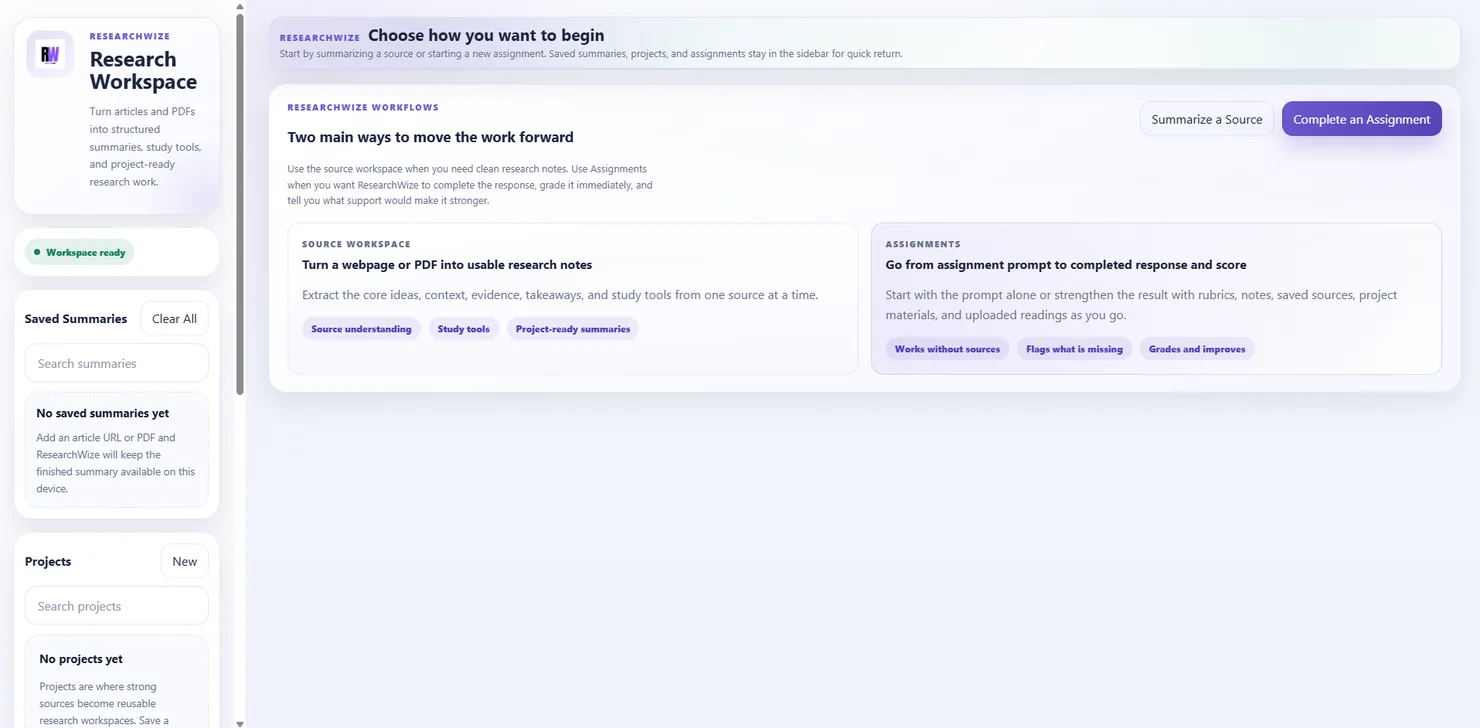
Two clear entry points
Start with a source when you need research notes, or start with the prompt when you need to complete the assignment first.
Everything stays connected
Summaries, projects, study tools, assignment drafts, and exports all live in the same workflow instead of scattered tabs.
Save the strongest source work into projects so you can compare readings, reuse material, and return to it later.
Write assignments, build presentation decks, export polished files, and keep improving the work when stronger support is added.
What the web app does
ResearchWize connects the full workflow from source work to finished output
Instead of using one tool to summarize, another to organize notes, and another to write, ResearchWize keeps each part of the process in the same browser workspace.
Source summaries that stay usable
Bring in articles and PDFs, choose the summary style that fits the task, and turn raw source material into notes you can actually study, quote, and reuse.
Projects that keep research together
Save strong summaries into projects so your sources, assignment work, and future outputs stay grouped instead of disappearing into browser history.
Study tools from the same source work
Create flashcards, discussion questions, quizzes, outlines, source analysis, and citations without starting over or pasting the source into a different tool.
Assignment completion in the same workspace
Paste the prompt, add the rubric if you have it, and let ResearchWize complete the response, review its strength, and show what support would improve it.
How ResearchWize works
Use the path that matches the work in front of you
Students do not always start at the same step. Sometimes the source comes first. Sometimes the assignment prompt is already sitting in the LMS. The web app supports both starting points.
Start with a source
Paste a webpage URL or upload a PDF to build a structured source workspace. From there you can review the summary, save it into a project, open summary chat, and generate study tools or writing support.
Articles
PDF documents
Key terms
Project-ready notes
Start with an assignment
Paste the prompt, rubric, teacher notes, and course context. ResearchWize can complete the response first, then help you strengthen it with saved project sources, fresh readings, and updated support.
Essays
Research papers
Discussion posts
Presentations
Core capabilities
What you can create inside the web app
The web app is not limited to one output type. It is designed to move from source understanding to study prep and assignment completion without forcing a restart.
Structured summaries
Main ideas, evidence, context, takeaways, why the source matters, and key terms are organized into a summary workspace that is built for reuse.
Study outputs
Generate flashcards, discussion questions, study quizzes, essay outlines, source analysis, and citations from the source material you already processed.
Project workspaces
Keep multiple saved summaries together, compare stronger sources, and use project chat or assignment links without rebuilding the research foundation.
Completed assignments
Draft an essay, research paper, short response, discussion post, reflection, or presentation from the prompt alone or from linked materials.
Presentation decks
Choose slide count and theme, build a deck from the assignment workflow, preview it, and export a PPTX with a final Works Cited slide and presenter notes.
Exports you can keep
Move work out of the app as Word or PDF files, and keep polished outputs ready for class, review, sharing, or the next revision pass.
From intake to export
A workflow built to reduce rework
The biggest advantage of the web app is continuity. Source work, project organization, assignment drafting, and export all happen inside a single system.
01
Bring in the material or the task
Start with a source when you need to understand the material, or start with the prompt when you already know the assignment you need to finish.
02
Build structured context
ResearchWize organizes summaries, key terms, takeaways, prompts, rubric details, and source support so the next step is clearer and faster.
03
Create the output you actually need
Move into study tools, source analysis, citations, essays, research papers, discussion posts, or presentation decks without switching to another product.
04
Improve the result with stronger support
When the work needs better evidence, another reading, or a clearer angle, add it to the same workspace and update the finished response instead of starting again.
Related pages
Explore the parts of the web app in more detail
These pages go deeper into the two main workflows plus the related tools that support research, study prep, and assignment writing.
FAQ
Questions about the ResearchWize web app
The ResearchWize web app is a browser-based workspace for source summaries, project organization, study outputs, and assignment completion. It is designed to keep those parts of the workflow connected instead of split across multiple tools.
Yes. The source workflow is built for webpage URLs and PDF uploads. From there, ResearchWize turns the material into structured notes, key terms, takeaways, and reusable outputs.
You can create structured summaries, flashcards, discussion questions, study quizzes, essay outlines, source analysis, citations, completed assignments, presentation decks, and exportable files.
No. The web app is the main workspace. The browser extension is useful as a companion when you want to pull webpages into ResearchWize faster while you browse.
It is especially useful for students who need to understand source material, stay organized across multiple readings, and turn research into finished schoolwork more efficiently.
Open ResearchWize
Start with a source or jump straight into the assignment
Use the full web app workflow when you want summaries, projects, study tools, and completed assignments to stay in the same place from the first step to the final export.